BAS / EMS • Commissioning • Energy Analytics
Docs — BAS / EMS Field Guide
Owner-side field reference for multi-site grocery and facility operations: EMS design, commissioning, retro-commissioning, refrigeration / HVAC coordination, and measured-savings project tracking.
Field Use Overview
Docs is a quick-reference workbench for BAS / EMS field use. It is tuned for real job-site questions: what is fighting what, what is wasting energy, what is not alarmed, what is mis-programmed, and what findings are worth turning into a funded project.
Commissioning & RCx
Verify installs, point mapping, schedules, alarms, safeties, and sequences before issues become normalized.EMS Design & Programming
Check that HVAC, lighting, and refrigeration are designed to work together rather than fighting each other.Energy Analytics & Payback
Turn trend data, weather, runtime, and utility cost into actionable savings stories management can fund.Multi-Site Field Use
Prioritize stores with high cost, repetitive alarms, humidity complaints, or poor nighttime shutdown behavior.Planning Guides
Refrigeration Planning
Case stability, walk-ins, unit coolers, pack strategies, humidity conflicts, defrost, anti-sweat, and operator red flags now live in a dedicated workflow tab.HVAC Planning
RTU schedules, economizers, dew point, alarms, overrides, and owner-side evidence collection now live in a dedicated HVAC planning tab.BAS Fundamentals
A Building Automation System (BAS) — also called a Building Management System (BMS) — is a network of hardware and software that monitors and controls mechanical, electrical, and life-safety systems in a building: HVAC, lighting, refrigeration, metering, access control, and fire/smoke. Modern BAS platforms sit on top of open protocols so that devices from many vendors can interoperate.
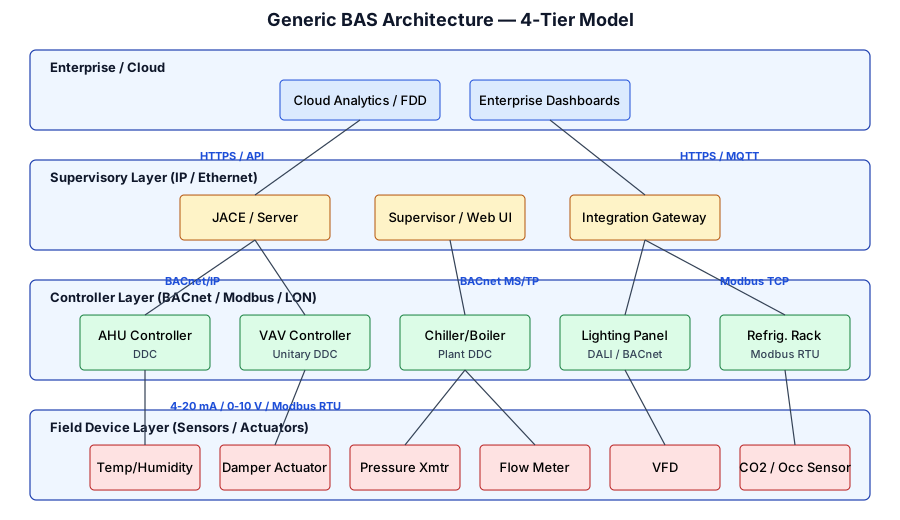
The 4-Tier Model
1. Field Device Layer
Sensors (temperature, pressure, CO₂, humidity), actuators (valves, dampers, VFDs), meters, switches. Often analog (4–20 mA, 0–10 V) or simple digital I/O.2. Controller Layer
Direct Digital Controllers (DDC) — programmable logic running control sequences (PID loops, schedules). Typically speak BACnet MS/TP, Modbus RTU, or LonWorks.3. Supervisory Layer
Edge gateways / JACEs / Automation Servers that aggregate field buses, run higher-level logic, serve web UIs, and expose BACnet/IP or APIs.4. Enterprise / Cloud
Central dashboards, historians, fault detection & diagnostics (FDD), energy analytics, multi-site management.Why this workbench matters
Every platform has its own terminology, tooling, and documentation silo. Owner-side work often depends on quickly connecting platform specifics to operational reality: humidity problems, poor schedules, weak alarms, misapplied economizers, refrigeration / HVAC conflicts, and whether the fix can be justified with measured savings.
Cross-Industry Standards
- ASHRAE 135 — BACnet — the dominant open BAS protocol
- Modbus Organization specs — ubiquitous serial/TCP protocol
- Project Haystack — semantic tagging of equipment data
- Brick Schema — standardized building metadata
- IEC 61131-3 — PLC programming languages
Refrigeration Planning
Use this tab when the site problem is rooted in case temperature stability, door sweat, walk-in performance, pack control, defrost behavior, anti-sweat logic, or poor coordination between refrigeration equipment and store HVAC.
Cases & Merchandisers
Verify setpoint stability, product temperature, curtain performance, door closure, anti-sweat heater logic, and sensor placement before blaming the rack.Walk-Ins & Unit Coolers
Check evaporator condition, drain heat, fan logic, defrost termination, box sensor location, and pressure or EEV strategy against actual room load.Packs & Controls
Review suction float, condenser control, compressor staging, oil management alarms, heat reclaim, and controller overrides that may have become permanent.Operations & Compliance
Confirm alarms are meaningful, food-safety records are trusted, and operators are not manually compensating for an issue the controls should handle automatically.Planning Walkthrough
| Focus Area | What to Verify | Evidence to Capture |
|---|---|---|
| Case Temperature Stability | Product temperatures, air discharge, door / gasket condition, sensor placement, and anti-sweat strategy. | Trend snapshots, field measurements, photos of ice / sweat, and complaint timing. |
| Defrost & Heater Logic | Termination on time vs. temperature, frequency, drain clear-down, heater runtimes, and post-defrost pull-down behavior. | Alarm history, defrost schedules, and trend overlays of case temperature vs. defrost state. |
| Packs & Suction Groups | Suction float, compressor staging delays, head pressure control, condenser cleanliness, and any pinned setpoints. | Controller screenshots, pressure trends, compressor runtimes, and maintenance observations. |
| Humidity Coordination | Store dew point, vestibule air leakage, rooftop discharge patterns, night setbacks, and whether case heaters are compensating for HVAC issues. | RH / dew-point logs, moisture photos, and notes on air movement around cases. |
| Walk-Ins / Unit Coolers | Evaporator icing, fan control, drain heat, box loading, door behavior, and whether the box sensor represents the actual storage condition. | Photos, temperature probes, defrost notes, and model / controller nameplate data. |
| Alarm Quality | Which alarms trigger action, which are ignored, and whether service teams are bypassing alarms instead of resolving root causes. | Alarm exports, service logs, and operator feedback. |
Common Grocery Red Flags
- Condensation on refrigerated case doors or water on the sales floor
- Ice on evaporators, iced-up drains, or heaters running hard in summer
- Store complaints that it is too cold while humidity is still too high
- Doors not closing properly, food waste, or cases losing temperature stability
- Packs running flat-out while controllers show “normal” because setpoints were widened
- Utility cost outliers between otherwise similar stores
Relevant Manuals
Jump into the Technical Library with refrigeration-focused filters. Hosted manuals open directly from this site; everything else falls back to the official vendor portal.
HVAC Planning
Use this tab when the issue is rooted in rooftop schedules, economizers, discharge air paths, humidity control, ventilation, alarm quality, or the way store HVAC is interacting with refrigerated equipment.
Schedules & Setbacks
Verify occupied / unoccupied schedules, holidays, and after-hours overrides before treating runtime as a mechanical problem.RTU Sequences
Check fan control, heating/cooling lockouts, discharge-air reset, economizer logic, and sensor sanity against actual field conditions.Humidity & Dew Point
Compare RH complaints to dew-point control, infiltration, vestibule use, and whether HVAC is forcing refrigeration equipment to compensate.Alarm Quality & Overrides
Look for disabled alarms, overridden points, failed sensors, comm loss, and controls tuned to suppress service calls rather than solve waste.Planning Walkthrough
| Focus Area | What to Verify | Evidence to Capture |
|---|---|---|
| Occupied / Unoccupied Logic | Schedules, holiday tables, warm-up / cool-down logic, and whether operators are relying on manual overrides. | Schedule screenshots, runtime trends, and override history. |
| Economizers & Ventilation | Outdoor-air dampers, failed actuators, lockouts, enthalpy assumptions, and whether “free cooling” is actually free in humid weather. | Damper position trends, outdoor conditions, and rooftop photos. |
| Heating / Cooling Coordination | Discharge-air control, reheat, simultaneous heating/cooling, supply fan logic, and whether sensors are driving false calls. | Trend overlays, setpoint history, and alarm exports. |
| Humidity Control | Store dew point, latent vs. sensible load, vestibule leakage, and interaction with anti-sweat or case-door condensation. | Indoor / outdoor psychrometric readings and complaint timing. |
| Maintenance Reality | Filters, belts, coils, drains, cracked tubing, failed sensors, and obvious deferred maintenance that sequences cannot hide. | Photos, PM notes, and issue recurrence history. |
| Funding Story | Whether the issue is a tuning fix, a controls retrofit, or a mechanical replacement candidate with measurable payback. | Before/after baselines, weather context, and utility-rate assumptions. |
Relevant Manuals
Use the Technical Library to jump into RTU portals, BAS / EMS references, and hosted controls documents where they exist.
Technical Library
This library reads from assets/technical_docs/documentation_index.csv. When a hosted copy exists in assets/manuals/, the View link opens the local manual. Otherwise, the link falls back to the official vendor or standards source in a new tab.
| Notes | View | |||||
|---|---|---|---|---|---|---|
| Loading documentation index… | ||||||
Niagara Framework (Tridium)
Overview
The Niagara Framework from Tridium (a Honeywell company) is a vendor-neutral integration platform for connecting diverse building and industrial devices. It normalizes device data into a common object model and provides programming, visualization, and management tools. Niagara is licensed and rebranded by ~400 OEM/integrator partners — Honeywell WEBs, Distech EC-Net, Vykon, Lynxspring, etc.
Major versions: Niagara AX (legacy, end-of-life), Niagara 4 (N4) — current; major releases 4.0 → 4.13+. Niagara runs on a Java-based distributed architecture called a Station.
Key Controllers and Hardware
| Model | Role | Key Specs |
|---|---|---|
| JACE 8000 | Edge supervisor / integrator | ARM CPU, 2 Ethernet, 2 RS-485, option slots; runs a Niagara Station |
| JACE 9000 (new gen) | Next-gen supervisor | Improved CPU, hardened cyber stack, N4.13+ |
| Edge 10 / Edge 534 | Compact IP controller | Built-in I/O, native Niagara Station, MQTT/BACnet |
| Niagara Supervisor | Windows/Linux server | Aggregates many JACEs, historian, alarms, web UI |
| Honeywell Spyder Model 5 | Field DDC (VAV/AHU/UC) | BACnet MS/TP; programmed from Workbench |
Communication Protocols
BACnet/IP BACnet MS/TP Modbus RTU Modbus TCP LonWorks (option) OPC UA MQTT SNMP KNX (driver) Fox / FoxS (Niagara-Niagara)
Niagara's strength is its driver architecture — each supported protocol is implemented as a module. Proxy points normalize foreign-device data into the Niagara object model.
Programming / Configuration
Engineering is done with Niagara Workbench — a Java desktop IDE. Control logic is built on wiresheets, a graphical dataflow canvas where components (Java classes) are wired together. A "station" is the running instance on a JACE or Supervisor; a BOG file is its serialized XML database.
// Example wiresheet component (pseudo)
TemperatureSensor.out --> PidLoop.in
Setpoint.out          --> PidLoop.sp
PidLoop.out           --> DamperActuator.in
Higher-level logic uses the Niagara Developer Documentation and can be extended in Java (modules packaged as .jar).
Architecture and Diagrams
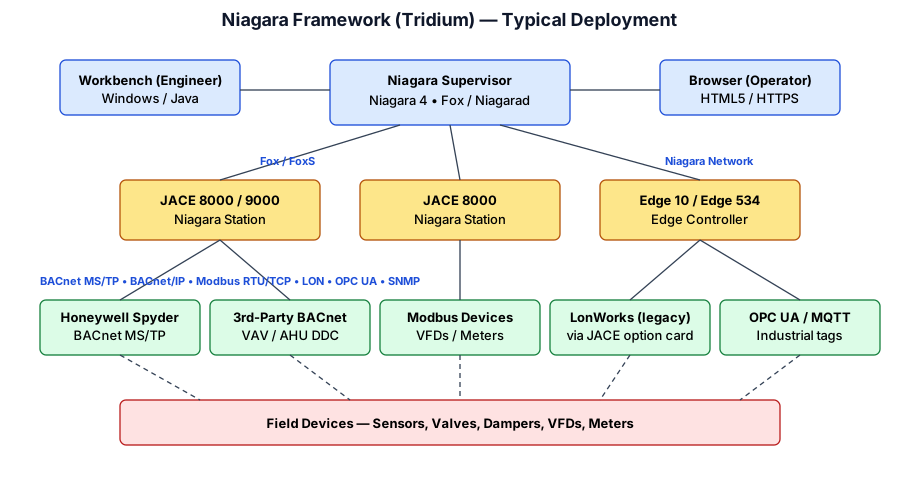
Typical topology: operators and engineers connect via browser or Workbench to a central Supervisor; the Supervisor aggregates multiple JACEs, each of which talks MS/TP or Modbus down to field DDCs and sensors. The whole system is a star of stars.
Official Documentation and Links
- docs.tridium.com — Niagara Official Documentation Portal
- Tridium — Niagara Framework Product Page
- Tridium — JACE 8000 Datasheet
- Niagara Community Portal (forum, resources)
- Tridium University — official training
- Honeywell Niagara (WEBs) Product Resources
Additional Resources
- Tridium YouTube channel
- r/Niagara4 — community subreddit
- ControlCo — Niagara integrator articles
- AutomatedBuildings.com — long-running BAS industry journal
Key Takeaways
- Universal integrator. If a device speaks any open protocol, Niagara probably has a driver.
- Workbench + wiresheets is the engineering surface; browsers are the operator surface.
- Licensing is per-station (by point counts / drivers) — plan capacity carefully.
- Cybersecurity hardening is mandatory on modern N4 (TLS, signed modules, code signing).
- Used across commercial real estate, campuses, hospitals, data centers, and industrial facilities.
Emerson Retail / Cold Chain Controls (E2, E3, ProAct, iPro)
Overview
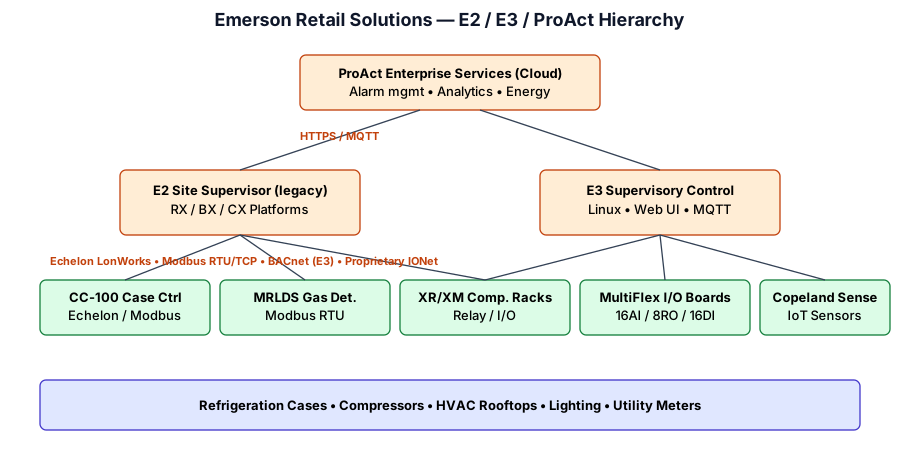
Emerson's Copeland / Retail Solutions portfolio dominates North American supermarket refrigeration and HVAC controls. The site supervisor is the focal point for compressor racks, refrigeration cases, lighting, HVAC rooftops, and utility monitoring. E2 is the long-serving legacy platform (2000s–present); E3 is the modern Linux-based successor launched in 2019. Cloud services are provided via ProAct (alarm management, analytics).
Key Controllers and Hardware
| Model | Role | Notes |
|---|---|---|
| E2 RX / BX / CX | Legacy site supervisor | RX = refrigeration, BX = HVAC/building, CX = convenience |
| E3 | Unified modern supervisor | Linux, responsive web UI, MQTT/REST, BACnet/IP |
| CC-100 / CS-100 | Case controller | Electronic superheat, defrost, anti-sweat |
| XR / XM Compressor Ctrls | Pack controllers | Suction / discharge pressure groups |
| MultiFlex I/O | Distributed I/O | 16AI, 8RO, 16DI on IONet / Echelon |
| iPro / ProAct Enterprise | Cloud / enterprise | Multi-site dashboards, Service Advisor |
Communication Protocols
IONet (proprietary) Echelon LonWorks Modbus RTU/TCP BACnet/IP (E3) MQTT (E3) HTTPS / REST (E3)
E2 networks rely heavily on Echelon LonWorks over twisted-pair (FTT-10 / 78 kbps). E3 supports BACnet/IP and modern IP-first protocols while remaining backward-compatible with the Echelon device population.
Programming / Configuration
E2 is menu-driven via front-panel keypad or the UltraSite32 / web terminal. Configuration is structured around Applications (e.g., SUCTION GRP, CIRCUIT, HVAC ZONE) which are instantiated and point-mapped. E3 replaces this with a modern responsive web UI but preserves the same application model. Bulk editing is done via .dsf / .edf description files.
; E2 application example (conceptual)
APPLICATION: SUCTION_GRP_A
  CTRL_METHOD: FLOAT
  SETPOINT: 20.0 PSI
  COMPRESSORS: 3
  STAGE_DELAY: 45 s
Official Documentation and Links
- Emerson — E3 Supervisory Control
- E2 RX/BX/CX Installation & Operation Manual (PDF)
- ProAct Alarm Services
- Emerson Technical Documentation Portal
- Copeland Commercial Controls Landing Page
Additional Resources
- Emerson Climate Technologies YouTube
- Emerson Training & Education (Educate)
- Retail Insight Network — refrigeration trends
Key Takeaways
- Dominant in supermarket refrigeration and c-store HVAC.
- E2 → E3 migration is the major industry shift; both coexist on large chains for years.
- Heavy reliance on Echelon LON at the field level — familiarity with LonMaker helps.
- ProAct is Emerson's 24/7 managed alarm / analytics service — a major SaaS offering.
Resource Data Management — RDM
Overview
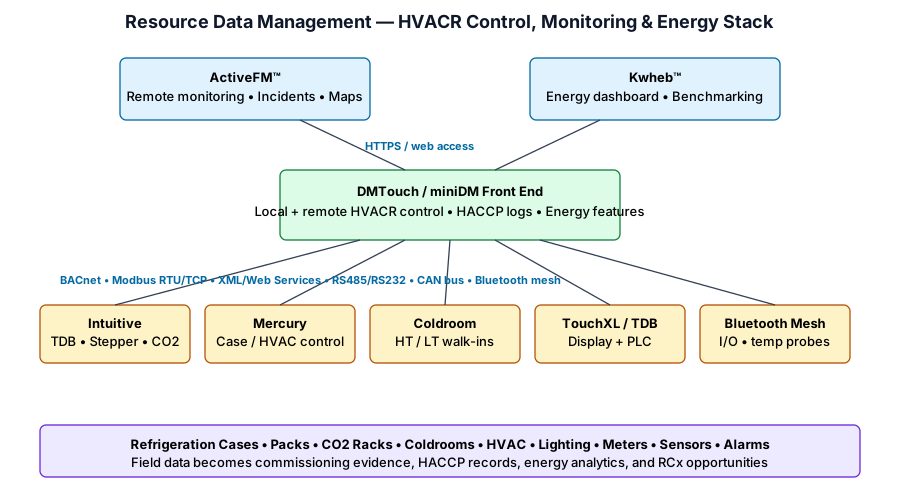
Resource Data Management (RDM) designs and manufactures HVACR control, remote monitoring, and energy-management products for refrigeration, BEMS / HVAC, regulatory compliance, and multi-site facility management. RDM is especially relevant to owner-side work because its products sit directly at the intersection of grocery refrigeration, HVAC, lighting, energy metering, alarm handling, HACCP temperature records, and estate-wide analytics.
RDM positions its platform around three owner-side outcomes: control HVACR assets, manage energy, and ensure regulatory compliance. The portfolio spans local front-end controllers, programmable PLC-style controllers, case and coldroom controllers, wireless sensors, cloud dashboards, and remote monitoring software.
Where RDM Fits
Food Retail / Grocery
Controls and monitors refrigeration cases, coldrooms, packs, condensers, HVAC units, lighting, meters, alarms, and compliance records across individual stores or a full estate.BEMS / HVAC
Provides device-level HVACR control and front-end monitoring, with open protocols for integrating third-party equipment into a central strategy.Energy Management
Uses DMTouch, ActiveFM™, Kwheb™, TDB, metering, and performance indicators to expose waste and support corrective action.Compliance / HACCP
Captures temperature and operating data for food-safety due diligence, with alarm handling and data retention workflows.Primary Product Families
| RDM Product | Role | Field Notes |
|---|---|---|
| DMTouch | Control and monitoring front end | 10.1" multi-touch front end for local / remote HVACR monitoring, energy tools, HACCP logging, third-party integration, and optional TDB activation. |
| miniDM | Compact front end | DMTouch-style software in a smaller enclosure; RDM describes it as suited to smaller format applications and control of up to 32 devices. |
| ActiveFM™ | Enterprise remote monitoring software | Web dashboard for monitoring, incident handling, alarm workflow, remote access, predictive maintenance, Live Maps, and optional temperature data retention. |
| Intuitive | HVACR controller range | Includes TDB PLC controllers, Mini TDB, Stepper pack / CO2 controllers, and TouchXL controller/display options for rack, circuit, plant, and BMS applications. |
| Mercury | HVAC / refrigeration controller range | DIN or panel-mount controllers for temperature, pressure, humidity, light-level, case, pack, coldroom, and BMS applications. Some variants support hydrocarbon refrigerants. |
| Coldroom Panels | LT / HT walk-in control | Mercury-based panels for high-temp produce rooms and low-temp freezer rooms; variants support LLV, PWM EEV, stepper EEV, pressure transducers, and removable remote displays. |
| TouchXL | HD display / PLC controller | 10.1" touchscreen used as a DMTouch or Intuitive display, alarm console, or combined TouchXL TDB PLC controller and display. |
| Bluetooth | Wireless control and monitoring | Mesh topology for retrofit or space-constrained installs; includes I/O modules, network interfaces, battery temperature probes, access points, and repeaters. |
| TDB | PLC-style programming software | Built into Intuitive TDB and TouchXL TDB, available for DMTouch activation, with lifetime hardware licence and free desktop editing software. |
| Kwheb™ | Cloud energy dashboard | Collates estate energy data from HVACR assets and meters; supports hourly/daily/weekly consumption views, regional dashboards, benchmarking, demand drill-down, and Excel export. |
| Sensors / Accessories | Field layer and expansion | Temperature, humidity, light, pressure transducers, current transformers, data loggers, displays, daughter cards, expansion boards, RS485 / Modbus interfaces, and communications options. |
Communication and Integration
Ethernet IP BACnet Modbus RTU/TCP RS485 RS232 CAN bus XML Web Services Bluetooth Mesh
RDM repeatedly emphasizes open protocols and third-party integration. DMTouch and miniDM can integrate existing HVACR equipment over protocols including Ethernet IP, BACnet, Modbus, XML, and CAN bus. Intuitive TDB controllers can communicate upward via BACnet, XML, and Web Services and downward via Modbus. Coldroom and Mercury ranges can include integrated IP, Ethernet, RS485, or RS232 options depending on model and option cards.
Programming / Configuration
TDB is RDM's programmable logic controller software. It is built into Intuitive TDB and TouchXL TDB and can be activated on DMTouch. RDM describes TDB as highly configurable, with free desktop editing software, multi-page programs, copy/paste, shortcut blocks, and lifetime licensing tied to supported hardware rather than annual licence fees.
For field work, separate three layers when troubleshooting: the controller application (Mercury / Intuitive / Coldroom), the front-end strategy (DMTouch / miniDM schedules, alarms, energy features, point mappings), and the enterprise workflow (ActiveFM / Kwheb alarm handling, dashboards, exports, and analytics).
// RDM site strategy concept
DMTouch / miniDM front end
  ├─ Mercury case controllers: temperature, defrost, trim heaters, alarms
  ├─ Intuitive Stepper / TDB: pack, CO2 rack, heat reclaim, HVAC and lighting
  ├─ Coldroom panels: HT / LT walk-ins, LLV or EEV control
  ├─ Meters and sensors: kWh, current, humidity, pressure, light, ambient temp
  └─ ActiveFM / Kwheb: remote alarms, energy trends, compliance records, exports
Energy and RCx Features Worth Looking For
| Feature / Tool | What it Means in the Field | Why It Matters |
|---|---|---|
| TPI — Temperature Performance Indicator | Scores case or coldroom performance using variables such as setpoint, differential, over-temperature alarms, and under-temperature alarms. | Quickly flags poor performers before a nuisance temperature issue becomes product loss or a service escalation. |
| Pack Optimisation | Adjusts target pack pressure based on average evaporator valve openings; RDM states this can typically reduce pack power by 10–30% without degrading case temperature control. | Prime RCx target: validate valve positions, suction targets, overrides, staging delays, and temperature stability. |
| Condenser TD | Monitors condenser efficiency and alarms at pre-warning, warning, and alarm levels when condenser performance degrades. | Links maintenance reality—dirty coils, fan issues, airflow problems—to measurable energy waste. |
| Defrost Warning | Warns when repeated defrost cycles terminate on time rather than temperature, which can indicate incomplete ice clearing. | Helps separate controls tuning, heater issues, sensor placement, and airflow/ice problems. |
| Network Trim Control | Uses humidity and ambient temperature readings to adjust anti-sweat / trim heater output. RDM reports a 30–50% trim heater load reduction opportunity. | Directly relevant to grocery humidity, condensation, door sweat, and unnecessary electric heat. |
| Night Blind Detection | Compares case temperatures to identify open-air cases where night blinds were not used after trading hours; RDM notes covered cases can reduce case power requirement by up to 40%. | Turns operations behavior into an actionable exception report, not just a training memo. |
| RPI — Refrigeration Performance Indicator | DMTouch analytical tool for comparing display cases, coldroom evaporators, system designs, sites, COPe, heat reclaim, duty, and energy input. | Useful for capital planning: compare systems and components before recommending replacement or optimization work. |
| Kwheb Energy Dashboard | Cloud dashboard for estate energy data, consumption graphs, regional/site dashboards, meter readings, budgets, benchmarking, and Excel exports. | Perfect source material for Plotly Studio / Excel analysis and owner payback narratives. |
RDM Field Walk Checklist
Front End / Access
- Identify whether the site uses DMTouch, miniDM, ActiveFM, Kwheb, or standalone controllers.
- Confirm software/firmware versions from the current RDM documentation page before making recommendations.
- Check user access, alarm routing, remote connectivity, and whether support-account documentation is available.
- Document third-party equipment mappings and confirm whether each integration is BACnet, Modbus, XML/Web Services, RS485, RS232, CAN bus, or Bluetooth.
Refrigeration / Cold Chain
- Review case temperatures, coldroom HT/LT configuration, defrost terminations, fan control, EEV/LLV operation, and pressure transducer sanity.
- Look for TPI, pack optimization, condenser TD, defrost warning, trim heater control, and night blind reports.
- Confirm CO2, hydrocarbon, or HFC application details before touching pressure, safety, or expansion-valve assumptions.
- Compare reported alarms against product loss, door sweat, ice, nuisance service calls, and staff workarounds.
Energy / Analytics
- Export meter, trend, alarm, and site-comparison data where available; Kwheb exports to Excel are especially useful for analysis.
- Normalize savings claims against weather, occupancy/trading hours, refrigeration load, and equipment changes.
- Look for load that should follow schedules but does not: lighting, anti-sweat, fans, HVAC, signage, heaters, and pumps.
- Use Plotly Studio or Excel to identify outlier stores, abnormal baseloads, drift, and repeated exceptions.
Commissioning / RCx
- Verify alarm thresholds, escalations, delays, and whether ActiveFM incidents are meaningful or ignored.
- Confirm schedules, holiday logic, security-system integration, setback behavior, and occupied/unoccupied transitions.
- Validate sensor placement, calibration, point labels, units, scaling, polarity, and controller-to-front-end mappings.
- Separate quick parameter fixes from capital recommendations such as controllers, meters, sensors, gateways, or panel upgrades.
Known Documentation Areas
RDM's public documentation page lists product files and software guides, while the Resource Centre requires a support account sign-in for additional product documentation and software downloads. Examples visible on the public documentation index include current transformer documents, USB-to-RS485 Modbus interface guides, TDB Intuitive V2 / Mini TDB installation and user guides, DMTouch / miniDM commissioning and installation guides, Coldroom panel user guides, Intuitive V2 / Mini Superpack controller guides, Data Manager / Intuitive TDB Web Services documentation, pressure transducer user guides, and Mercury / Intuitive passcode guidance.
Official Documentation and Links
- RDM — Resource Data Management homepage
- RDM Product Range
- RDM Documentation downloads
- RDM Resource Centre / Support account login
- RDM Product Catalogue PDF
- RDM — Integration of HVACR assets into one control and monitoring system
Product and Feature Links
- DMTouch & miniDM — control and monitoring front end
- ActiveFM™ — remote monitoring and predictive maintenance software
- Intuitive controllers — PLC, rack, circuit and CO2 applications
- Mercury controllers — refrigeration and HVAC temperature control
- Coldroom panels — HT / LT walk-in control
- TouchXL — touchscreen controller / display
- RDM Bluetooth — wireless mesh control and monitoring
- TDB — programmable logic controller software
- Kwheb™ — cloud-based energy management dashboard
- RDM sensors
- RDM accessories and communications options
- DMTouch / miniDM energy-saving software features
- RPI — Refrigeration Performance Indicator
- RDM — Optimise Energy, Maximise Savings
Food Retail and Energy Case Studies
- Lunds & Byerlys — transcritical CO2 solution for US grocer
- Co-op — refrigeration plant energy reduced 42%, overall store / forecourt energy reduced 28%
- Pets at Home — BMS and LED retrofit reduced energy consumption by 34% across 420 stores
Key Takeaways
- DMTouch / miniDM are the local front-end layer; ActiveFM and Kwheb are the enterprise / analytics layer.
- Intuitive + TDB is the flexible PLC-style controls story; Mercury and Coldroom are the refrigeration / temperature-control workhorses.
- RDM is highly relevant to grocery RCx because it exposes refrigeration, HVAC, lighting, metering, alarm, and compliance data in one control ecosystem.
- Best first data pulls for Plotly Studio: Kwheb exports, ActiveFM alarms/incidents, DMTouch energy reports, case/coldroom performance, defrost events, night-blind exceptions, trim-heater trends, and pack optimization data.
- Do not assume a feature is enabled just because the hardware supports it. Verify licensed/activated features, installed option cards, firmware/software version, point mappings, and actual trend availability.
Honeywell (WEBs-N4, Spyder, CIPer)
Overview
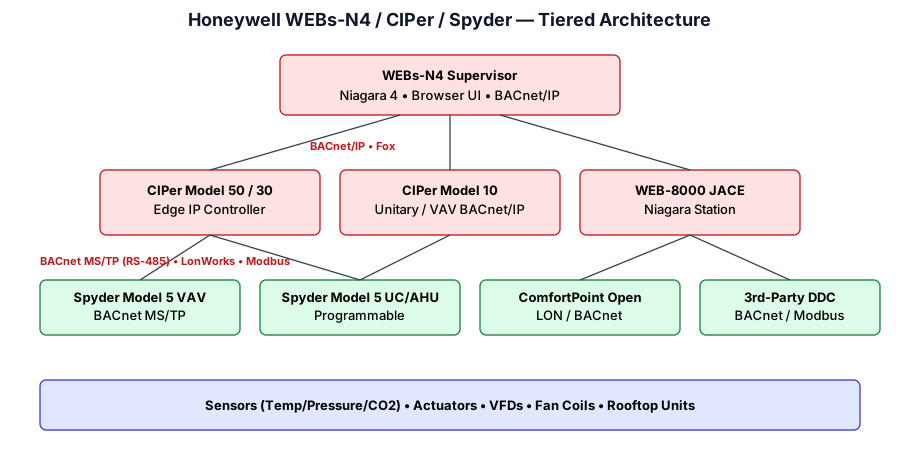
Honeywell's commercial BAS portfolio is anchored by WEBs-N4 — Honeywell's branded build of the Niagara 4 framework (Honeywell owns Tridium). Field-level programmable controllers include the Spyder Model 5 family and the IP-native CIPer series. Honeywell also continues the legacy ComfortPoint Open (CPO) line. In 2024, Honeywell announced plans to spin off its Building Automation business — but the product lines continue under the same names.
Key Controllers and Hardware
| Model | Role | Notes |
|---|---|---|
| WEB-8000 JACE | Supervisory controller | Niagara Station; 2× Ethernet, 2× RS-485 |
| CIPer Model 50 / 30 | IP-native edge controller | On-board I/O, BACnet/IP, HTML5 UI |
| CIPer Model 10 | Unitary IP controller | Rooftop / AHU / VAV, BACnet/IP |
| Spyder Model 5 VAV | VAV box controller | BACnet MS/TP, optional onboard actuator |
| Spyder Model 5 UC/AHU | Programmable AHU DDC | Expandable I/O via Spyder IO modules |
| ComfortPoint Open | Legacy line | LonWorks / BACnet |
Communication Protocols
BACnet/IP BACnet MS/TP LonWorks Modbus RTU/TCP (via Niagara) Fox / FoxS HTTPS / WebSocket
Programming / Configuration
WEBs-N4 and Spyder Model 5 are engineered with Niagara Workbench (identical tooling to generic Niagara). Legacy Spyder PUB/PVB were programmed with HVAC PRO / Niagara CARE; today those have been retired in favor of wiresheets in Workbench. CIPer controllers provide a built-in web engineering UI for smaller standalone jobs.
Official Documentation and Links
- Honeywell — Niagara Framework / WEBs Product Page
- Honeywell — Spyder Controllers
- Honeywell — CIPer IP Controllers
- Honeywell Customer Portal (manuals, firmware)
- Tridium docs — applies equally to WEBs-N4
Additional Resources
Key Takeaways
- WEBs-N4 == Honeywell-branded Niagara 4 — Workbench skills transfer directly.
- CIPer is the modern IP-first story; no JACE required for smaller jobs.
- Spyder Model 5 is the workhorse field DDC on most recent Honeywell projects.
- Commonly deployed in commercial office, retail, education, and healthcare segments.
Danfoss (AK-SM Series, Alsense)
Overview
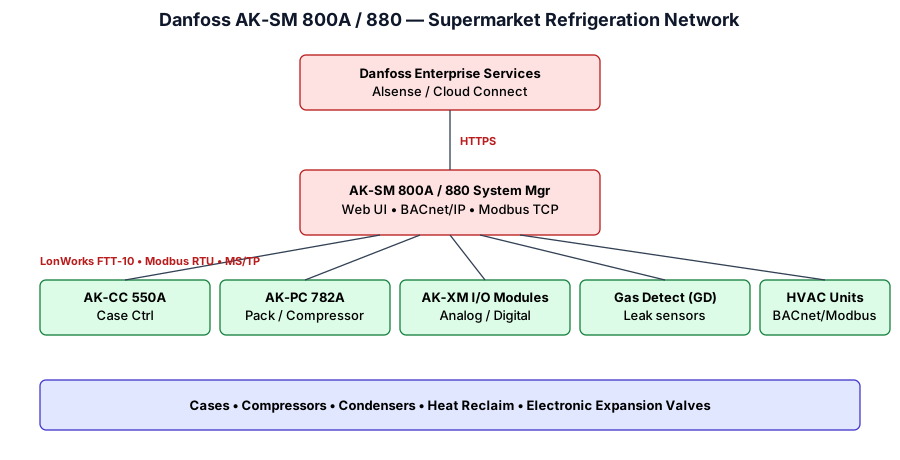
Danfoss Cooling is the global counterpart to Emerson in food-retail refrigeration controls, especially dominant in Europe and growing in North America. The AK-SM 800A / 880 (and prior AK-SM 850) is the site-level System Manager that aggregates Danfoss case controllers, pack controllers, and I/O modules and exposes the site to enterprise systems via BACnet/IP, Modbus TCP, or the Alsense cloud.
Key Controllers and Hardware
| Model | Role | Notes |
|---|---|---|
| AK-SM 800A / 880 | Site System Manager | Web UI, BACnet/IP, Modbus TCP, Alsense gateway |
| AK-CC 550A / 750A | Case controller | EEV, adaptive defrost, CO₂ capable |
| AK-PC 782A / 781A | Pack / compressor controller | Transcritical CO₂, subcritical, multi-stage |
| AK-XM I/O modules | Distributed I/O | Analog/digital expansion on LonWorks bus |
| Gas Detection (GD) | Refrigerant leak monitoring | CO₂, HFO, ammonia |
Communication Protocols
LonWorks FTT-10 Modbus RTU / TCP BACnet/IP (AK-SM uplink) BACnet MS/TP (limited) HTTPS / REST (Alsense)
Below the System Manager, Danfoss field buses are traditionally LonWorks at 78 kbps. Third-party HVAC equipment is typically integrated via Modbus or BACnet MS/TP and mapped into the AK-SM object tree.
Programming / Configuration
The AK-SM uses a wizard-driven web configuration: create suction groups, circuits, and HVAC zones, then bind them to device addresses. Device files (EDFs) describe each case/pack model; Service Tool (downloadable from Danfoss) is used for low-level device commissioning. Exports are in XML / CSV and can be cloned across similar stores.
Official Documentation and Links
- Danfoss — AK-SM 800A Series System Managers
- Danfoss Cooling Downloads (manuals, firmware, Service Tool)
- Alsense IoT Platform
- Danfoss CO₂ Refrigeration Resources
- Danfoss Learning Portal
Additional Resources
Key Takeaways
- Danfoss excels at transcritical CO₂ and natural-refrigerant refrigeration control.
- The AK-SM is the single pane of glass; everything below is typically LON.
- Alsense provides cloud-based multi-site monitoring, FDD, and energy.
- Strong global footprint in grocery retail and cold-chain logistics.
Schneider Electric — EcoStruxure Building Operation
Overview
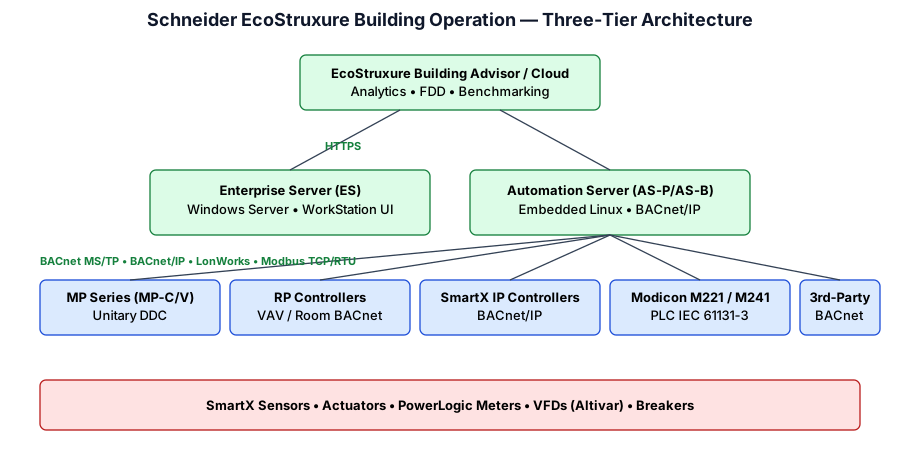
EcoStruxure Building Operation (EBO) is Schneider's integrated BMS platform (formerly StruxureWare Building Operation, originally from TAC Vista / Andover Continuum). It combines a Windows server backbone (Enterprise Server), embedded Linux Automation Servers, and the SmartX IP controller line. EBO integrates tightly with Schneider's power monitoring (PowerLogic / EcoStruxure Power) and with the building-side analytics product EcoStruxure Building Advisor.
Key Controllers and Hardware
| Model | Role | Notes |
|---|---|---|
| Enterprise Server (ES) | Server software | Windows Server; WorkStation thick-client UI + WebStation |
| AS-P / AS-B | Automation Server (Premium / Basic) | Embedded Linux; native BACnet/IP routing |
| SmartX IP Controllers | Unitary / AHU DDC | BACnet/IP over PoE; onboard I/O |
| MP Series (MP-C / MP-V) | Unitary BACnet MS/TP | Compact DDC |
| RP Controllers | VAV / Room | BACnet MS/TP, room bus for sensors |
| Modicon M221 / M241 | Industrial PLCs | IEC 61131-3, used in plant / process |
Communication Protocols
BACnet/IP BACnet MS/TP LonWorks (legacy TAC) Modbus RTU/TCP OPC UA / DA SNMP IEC 61850 (for power integrations)
Programming / Configuration
The engineering tool is WorkStation (thick client on Windows). Control logic can be authored in three ways:
- Script — a proprietary text language (similar to BASIC)
- Function Block Diagrams — graphical dataflow
- Menta — graphical language inherited from TAC
Modicon PLCs are programmed in Schneider's EcoStruxure Machine Expert (formerly SoMachine) using IEC 61131-3 languages (ST, LD, FBD, SFC, IL).
// EBO Script fragment
IF OutdoorAirTemp > 22.0 THEN
  SET ChilledWaterPump.Enable = TRUE
  SET AHU_1.EconomizerMode = "MinOA"
END IF
Official Documentation and Links
- Schneider — EcoStruxure Building
- EcoStruxure Building Operation Technical Reference (PDF)
- EcoStruxure Building Operation Product Range
- Schneider Download Center (manuals, firmware, software)
- Schneider Exchange — community / add-ons
Additional Resources
- Schneider Electric YouTube
- Schneider University / Field Services Training
- Schneider Electric Community forum
Key Takeaways
- EBO is a full-stack BMS — building, power, lighting all converge in WorkStation.
- Strong in large commercial, data center, and critical-power projects where power monitoring is in scope.
- Legacy TAC Vista / Andover Continuum installations are being migrated to EBO.
- Multi-paradigm programming (Script / FBD / Menta / IEC 61131-3).
Johnson Controls — Metasys
Overview
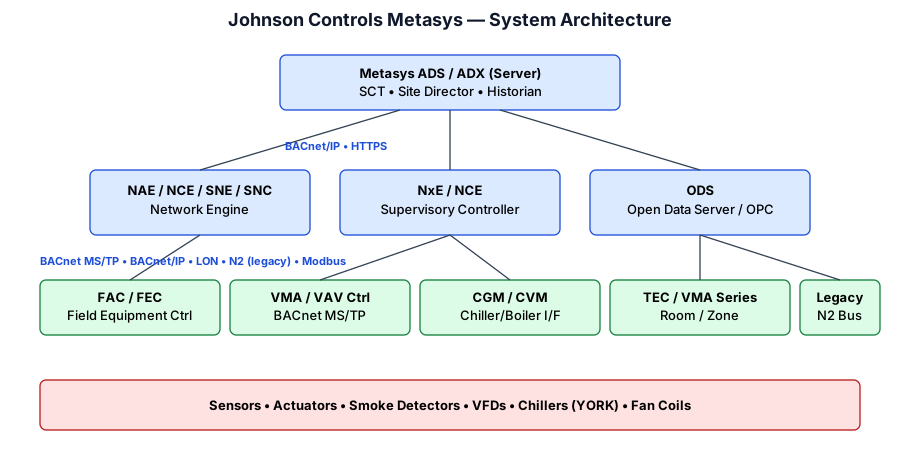
Metasys is Johnson Controls' flagship BMS. It is deployed in tens of thousands of commercial, institutional, and healthcare facilities worldwide. Architecture is layered: a central ADS/ADX server, Network Engines (NAE/NCE → SNE/SNC generations), and a deep bench of field controllers (FAC, FEC, VMA, TEC). Metasys integrates natively with York chillers, TYCO fire/security, and JCI's own digital platform OpenBlue.
Key Controllers and Hardware
| Model | Role | Notes |
|---|---|---|
| ADS / ADX | Application + Data Server | Windows Server; Site Director; historian |
| NAE 55 / 85 (legacy) | Network Automation Engine | Embedded web / BACnet/IP supervisor |
| SNE / SNC (current) | Smart Network Engine / Controller | Linux-based, BACnet Revision 14+, Java apps |
| FAC / FEC Series | Field Equipment Controller | Programmable; BACnet MS/TP; expandable IOM |
| VMA 16xx | VAV Modular Assembly | VAV controller with integrated actuator |
| TEC Thermostats | Room controllers | BACnet MS/TP / ZigBee variants |
| CGM / CVM | Chiller / VFD gateways | Interface to YORK chillers, pumps |
Communication Protocols
BACnet/IP BACnet MS/TP N2 (legacy JCI bus) LonWorks Modbus TCP/RTU OPC UA (via ODS) KNX / M-Bus (option)
N2 is Johnson's proprietary RS-485 legacy bus still found in many buildings. Modern JCI deployments are BACnet first, with N2 bridged via the network engine.
Programming / Configuration
Engineering is performed in Controller Configuration Tool (CCT) for field devices, and System Configuration Tool (SCT) for site-level objects, graphics, alarms, schedules, and user management. Logic is graphical (function blocks, connectors) with a proprietary compiled form. Graphics are built in the UI Generation tool and served to Metasys UI (HTML5).
Official Documentation and Links
- Johnson Controls — Metasys Product Page
- JCI Building Automation Documentation Portal
- OpenBlue Digital Platform
- JCI Controls Product Catalog (CG)
- JCI Partner / Branch Portal
Additional Resources
Key Takeaways
- Metasys is an end-to-end BMS: server, engines, field controllers, thermostats, chiller gateways.
- SNE/SNC replaces the long-serving NAE/NCE family; it is Linux-based and cyber-hardened.
- OpenBlue is JCI's analytics/cloud layer, pulling data from Metasys plus third-party systems.
- Common in healthcare, higher education, large government, and industrial facilities.
Other Protocols and Cross-Platform Controllers
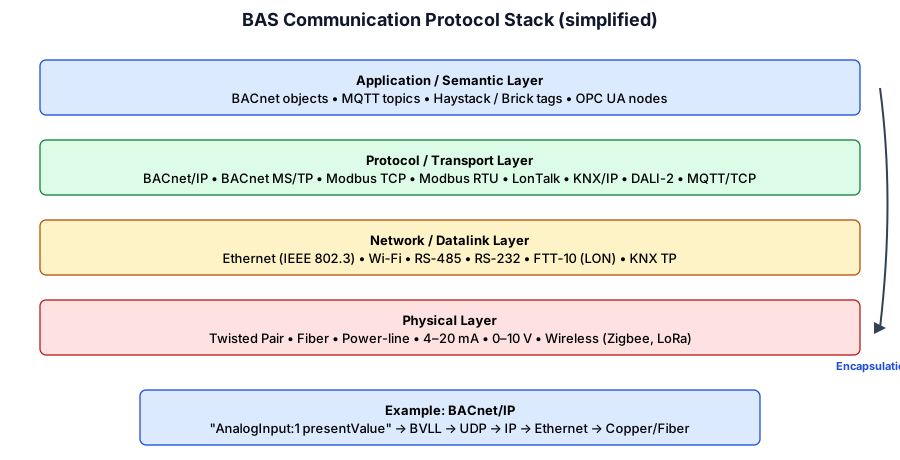
BAS platforms derive their real value from the openness of the protocols below. Understanding these protocols — independent of any vendor — is the most transferable skill in the industry.
BACnet (ASHRAE 135 / ISO 16484-5)
BACnet is the dominant open protocol in commercial BAS. It is object-oriented: every piece of data is an object (e.g., AnalogInput, BinaryOutput, Schedule, TrendLog) with a set of standardized properties (presentValue, units, description, priority array…). Services let devices subscribe, read, write, and alarm.
- BACnet/IP — UDP/47808 over Ethernet/Wi-Fi; uses BBMDs to bridge broadcast domains.
- BACnet MS/TP — token-passing master/slave over RS-485; typical speeds 9.6–76.8 kbps.
- BACnet/SC — Secure Connect (WebSocket + TLS) — the modern secure transport replacing BBMDs.
// Example BACnet object reference
Device: 1234 (Rooftop-1)
  AnalogInput:0  presentValue = 72.4  units = degreesFahrenheit  (Space Temp)
  AnalogValue:1  presentValue = 72.0  units = degreesFahrenheit  (Space SP, writable @ priority 8)
  BinaryOutput:2 presentValue = active  (Supply Fan Cmd)
Modbus
A 1979 Modicon protocol, extremely simple: a single master polls slaves by function code + register address. No object model — it's just numeric registers. Ubiquitous on VFDs, meters, and industrial equipment.
| Function | Purpose | Typical Use |
|---|---|---|
| 01 Read Coils | Read single-bit outputs | Relay states |
| 02 Read Discrete Inputs | Read single-bit inputs | Alarm contacts |
| 03 Read Holding Regs | Read 16-bit R/W registers | Setpoints, meter values |
| 04 Read Input Regs | Read 16-bit read-only | Sensor readings |
| 06 / 16 Write Regs | Write setpoints / commands | Start/stop, SP change |
- Modbus RTU — binary framing over RS-485 (most common in the field).
- Modbus ASCII — legacy human-readable framing.
- Modbus TCP — RTU payload wrapped in TCP/502; easy to integrate.
# Modbus register map snippet (power meter)
40001  Voltage_L1_N    scale 0.1  V
40003  Current_L1      scale 0.01 A
40005  Power_kW        scale 0.01 kW
40007  Energy_kWh      32-bit, hi/lo in 40007/40008
LonWorks (ISO/IEC 14908)
Developed by Echelon (1990s). Uses the LonTalk protocol; physical media include FTT-10 (twisted pair at 78 kbps) and power-line carrier. Data is exchanged as Standard Network Variable Types (SNVTs) — typed, unit-aware variables. Widely used in Emerson / Danfoss refrigeration and older European BAS installs. Declining in new construction but still very common in installed base.
KNX (ISO/IEC 14543)
European-origin open standard primarily for lighting, shading, and simple HVAC in residential/commercial buildings. Uses KNX TP (twisted pair) or KNX/IP. Engineering is done in ETS (Engineering Tool Software). Very strong in Europe and the Middle East.
DALI / DALI-2 (IEC 62386)
Digital Addressable Lighting Interface — dedicated lighting-control bus. Each ballast/driver has an address 0–63; broadcast, group, and individual commands. DALI-2 adds sensor/input-device classes. Often subtended below a BACnet/IP lighting gateway.
MQTT
Lightweight publish/subscribe protocol (OASIS standard) over TCP/1883 or TLS/8883. Not BAS-specific, but widely used in IoT-era BAS for cloud ingestion and edge analytics. Metasys, Niagara, Emerson E3, and Schneider EBO all expose MQTT options.
OPC UA (IEC 62541)
Object-oriented industrial protocol; strong in process / manufacturing and increasingly in smart buildings as a north-bound interface from BAS to enterprise historians (AVEVA, Ignition).
Protocol Comparison
| Protocol | Typical Media | Model | Complexity | Scalability | Typical Use |
|---|---|---|---|---|---|
| BACnet/IP | Ethernet | Client/server, objects | Medium | Very high | Commercial BAS backbone |
| BACnet MS/TP | RS-485 | Token-passing | Medium | ~30 devices/segment | VAV, unitary DDC |
| Modbus RTU | RS-485 | Master/slave, registers | Low | ~32 devices/segment | VFDs, meters, OEM gear |
| Modbus TCP | Ethernet | Master/slave, registers | Low | High | IP-connected industrial gear |
| LonWorks | FTT-10, PL | Peer, SNVTs | High | Medium | Refrigeration, legacy HVAC |
| KNX | TP, IP | Peer, objects | Medium | Medium | Lighting, EU residential |
| DALI-2 | DALI bus | Master/slave | Low | 64 devices/bus | Lighting control |
| MQTT | TCP/IP | Pub/sub, topics | Low | Very high | IoT, cloud ingestion |
| OPC UA | TCP/IP | Client/server, nodes | High | Very high | Industrial / SCADA bridge |
Authoritative Standards & References
- ASHRAE — Standard 135 (BACnet)
- BACnet.org — official portal
- BACnet International — industry body & BTL certification
- Modbus Organization — specifications
- LonMark International (LonWorks certification)
- KNX Association
- DiiA — DALI Alliance
- MQTT.org — community & specs
- OPC Foundation
- Project Haystack — semantic tagging
Key Takeaways
- Learn BACnet + Modbus first — they cover 90% of real-world integrations.
- Understand the physical vs protocol vs application layering — problems usually live at one specific layer.
- Watch the transition from BBMDs → BACnet/SC as IT security requirements grow.
- MQTT and OPC UA are the north-bound story; BACnet and Modbus remain the south-bound reality.